Hello Quarto
SDSS 2023: Reproducible Documents, Websites,
and Books with Quarto
Duke University + Posit
2023-05-23
Pre-workshop instructions
While you wait for the workshop to begin…
Download and install the latest versions of R, RStudio, and Quarto:
Install the following packages:
- Download
exercises.zipat https://mine.quarto.pub/quarto-sdss/exercises.zip and unzip it on your Desktop or somewhere you can easily locate on your computer. Then, go to RStudio > File > New Project > Existing Directory and navigate to the unzippedexercisesfolder and create an RStudio project in there and open it.
Or, click here to join the Posit Cloud space for the workshop.
Welcome
Room info
WiFi: Curio Meeting / 1820
Emergency exits behind you
Restrooms: Out the door and turn right, then men’s to the left, women’s to the right
Code of Conduct
The American Statistical Association (ASA) is committed to providing an atmosphere in which personal respect and intellectual growth are valued and the free expression and exchange of ideas are encouraged. Consistent with this commitment, it is the policy of the ASA that all participants in ASA activities enjoy a welcoming environment free from unlawful discrimination, harassment, and retaliation. We strive to be a community that welcomes and supports people of all backgrounds and identities. This includes, but is not limited to, members of any race, ethnicity, culture, national origin, color, immigration status, social and economic class, educational level, sex, sexual orientation, gender identity and expression, age, size, family status, political belief, religion, and mental and physical ability.
Expected Behavior
Model and support the norms of respect necessary to promote the conditions for healthy exchange of scientific ideas.
In speech or conduct, do not insult or disparage other participants.
Be conscious of hierarchical structures, specifically the existence of stark power differentials between students, early career statisticians and established career statisticians—noting that fear of retaliation from more established statisticians can make it difficult for students and early career statisticians to express discomfort, rebuff unwelcome advances, and report violations of the conduct policy.
Be sensitive to indications that may suggest that individuals are feeling unwelcome.
Teaching team
Instructor: Mine Çetinkaya-Rundel
Professor of the Practice, Duke University - Statistical Science
Developer Educator, Posit
TA: Tracy Teal
- Open Source Program Director, Posit
Both: R Markdown users/educators for 10+ years, Quarto users/educators for 1+ years
About you
Meet 1-2 people around you!
02:00
Workshop structure
My turn: Lecture segments + live coding
Our turn: Live coding + follow along
Your turn: Exercises
Getting help
During my turn and our turn segments – raise your hand
During your turn segments – also feel free to raise your hand for questions but use the stickies to signal:
- Pink: I’d like some help / I’m stuck / I’m lost
- Green: I’m done
Hello Quarto
Meeting you where you are
I’ll assume you
know some R
have worked in RStudio
want to learn about Quarto
I’ll teach you
Quarto syntax and formats
More Markdown
Even more R along the way!
Checking in one more time
Have you completed the following?
Download and install the latest versions of R, RStudio, and Quarto:
Install the following packages:
Download
exercises.zipat https://mine.quarto.pub/quarto-sdss/exercises.zip and unzip it on your Desktop or somewhere you can easily locate on your computer. Then, go to RStudio > File > New Project > Existing Directory and navigate to the unzippedexercisesfolder and create an RStudio project in there and open it.
Let’s get started!
What is Quarto?
Quarto …
- is a new, open-source, scientific, and technical publishing system
- aims to make the process of creating and collaborating dramatically better
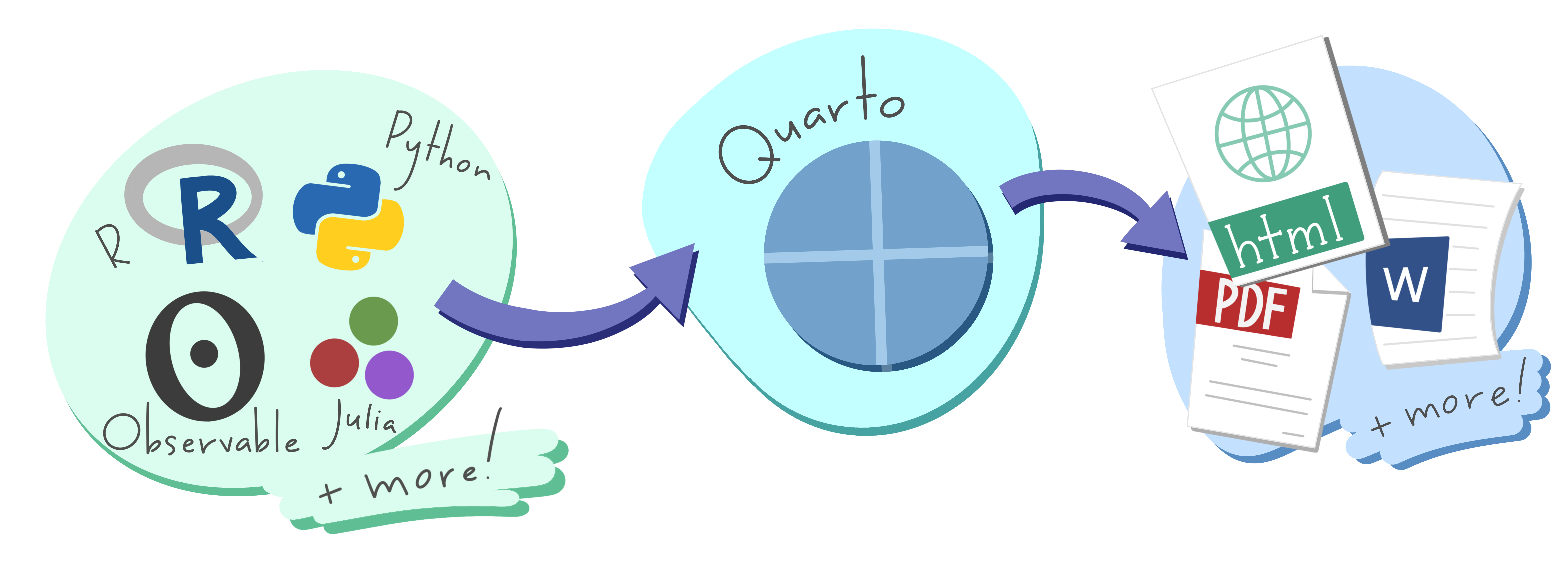
Artwork from “Hello, Quarto” keynote by Julia Lowndes and Mine Çetinkaya-Rundel, presented at RStudio Conference 2022. Illustrated by Allison Horst.
Quarto
With Quarto you can weave together narrative text and code to produce elegantly formatted output as documents, web pages, blog posts, books and more.
just like R Markdown…
but not just like it, there’s more to it…
Quarto …
unifies + extends the R Markdown ecosystem
Quarto …
unifies + extends the R Markdown ecosystem
unifies for people who love R Markdown
Quarto …
unifies + extends the R Markdown ecosystem
unifies for people who love R Markdown
extends for people who don’t know R Markdown
Quarto unifies + extends R Markdown
- Consistent implementation of attractive and handy features across outputs: tabsets, code-folding, syntax highlighting, etc.
- More accessible defaults as well as better support for accessibility
- Guardrails, particularly helpful for new learners: YAML completion, informative syntax errors, etc.
- Support for other languages like Python, Julia, Observable, and more via Jupyter engine for executable code chunks.
A tour of Quarto
Sit back and enjoy!
Your turn
Open hello-penguins.qmd in RStudio and with the visual editor. Render the document. Update your name and re-render. Inspect components of the document and make one more update and re-render. Compare notes with neighbors about updates you’ve made and note any aspects of the document that are not clear after the tour and your first interaction with it.
10:00
Quarto CLI
Revisit: What is Quarto?
Quarto is a command line interface (CLI) that renders plain text formats (.qmd, .rmd, .md) OR mixed formats (.ipynb/Jupyter notebook) into static PDF/Word/HTML reports, books, websites, presentations and more.
mine$ quarto --help

  Usage:   quarto
  Version: 1.3.353

  Description:

    Quarto CLI

  Options:

    -h, --help     - Show this help.
    -V, --version  - Show the version number for this program.

  Commands:

    render          [input] [args...]     - Render files or projects to various document types.
    preview         [file] [args...]      - Render and preview a document or website project.
    serve           [input]               - Serve a Shiny interactive document.
    create          [type] [commands...]  - Create a Quarto project or extension
    create-project  [dir]                 - Create a project for rendering multiple documents
    convert         <input>               - Convert documents to alternate representations.
    pandoc          [args...]             - Run the version of Pandoc embedded within Quarto.
    run             [script] [args...]    - Run a TypeScript, R, Python, or Lua script.
    add             <extension>           - Add an extension to this folder or project
    install         [target...]           - Installs an extension or global dependency.
    publish         [provider] [path]     - Publish a document or project. Available providers include:
    check           [target]              - Verify correct functioning of Quarto installation.
    help            [command]             - Show this help or the help of a sub-command.
Quarto, more than just knitr
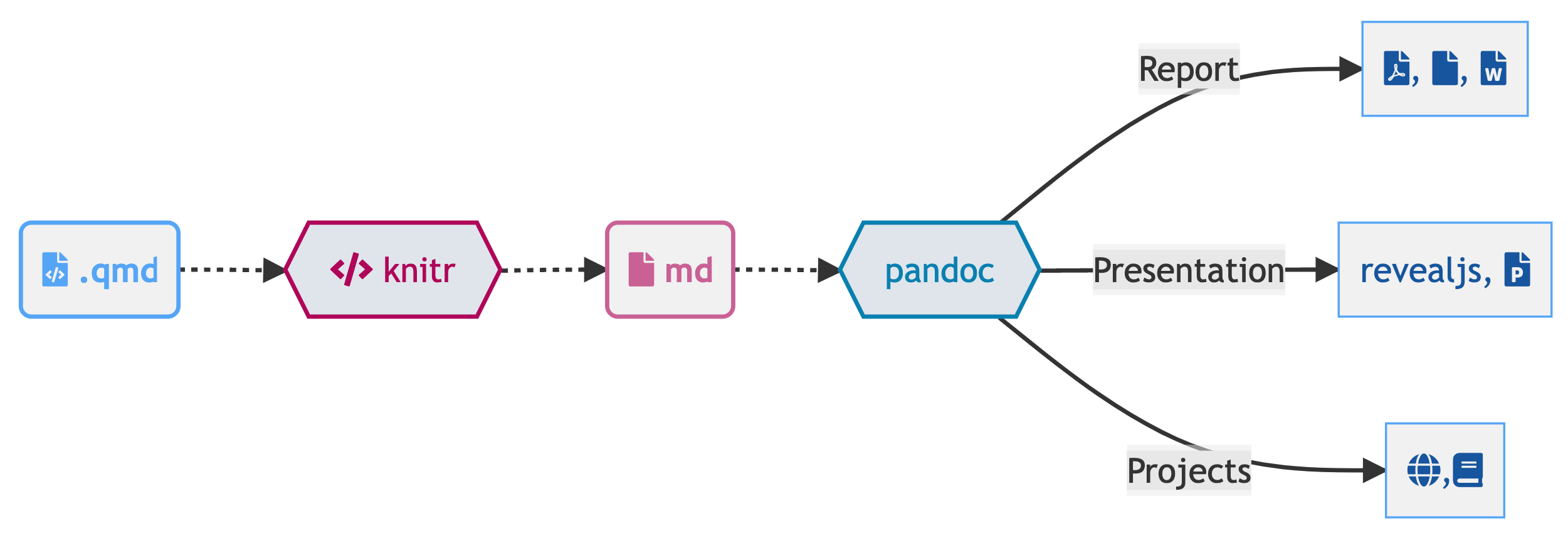
We learned from 10 years of literate programming with knitr + rmarkdown
Quarto, more than just knitr
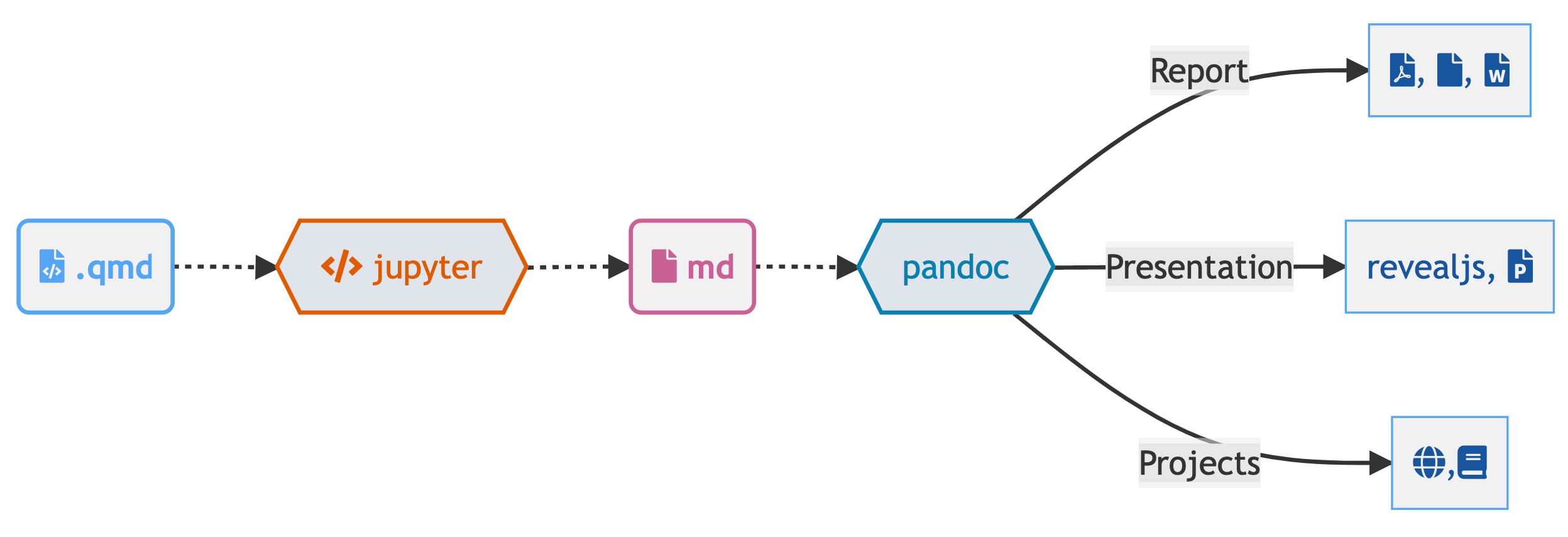
Quarto: More than just knitr
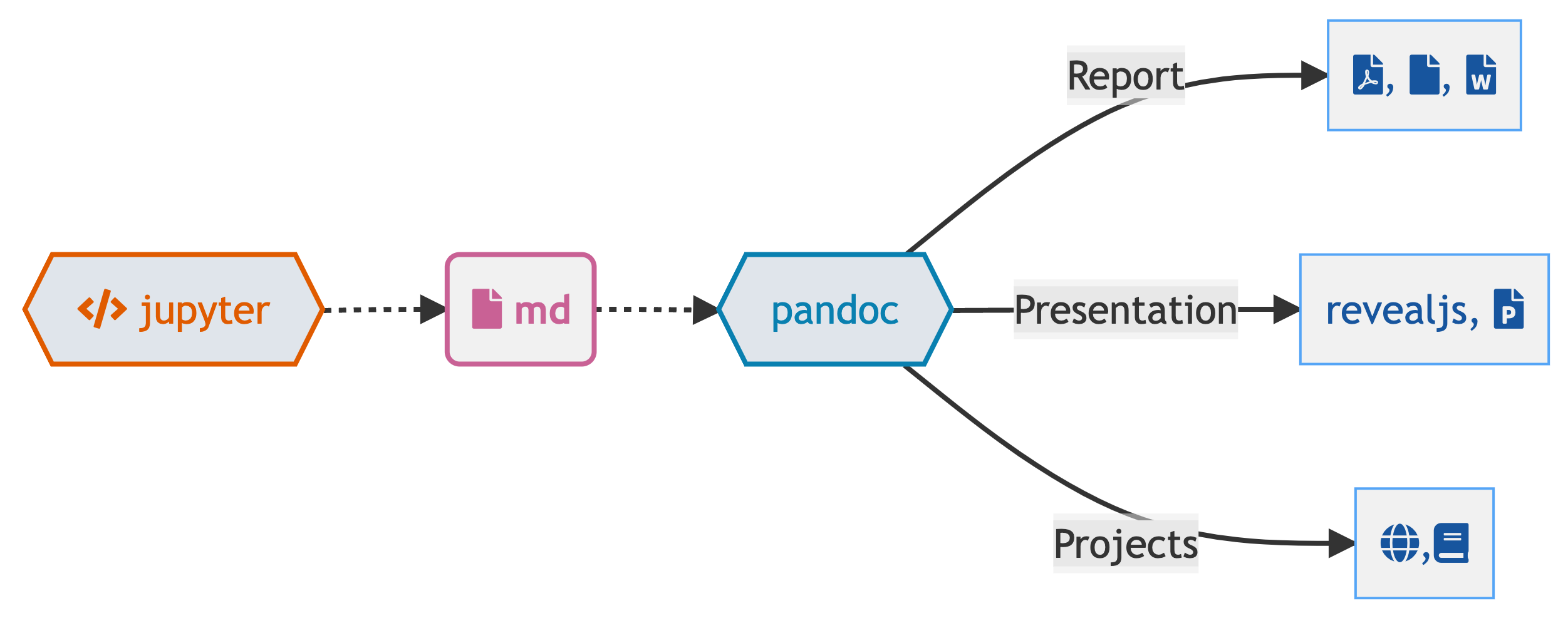
Under the hood
knitrorjupyterevaluates R/Python/Julia code and returns a.mdfile along with the evaluated code- Quarto applies Lua filters + CSS/LaTeX which is then evaluated alongside the
.mdfile by Pandoc and converted to a final output format
Aside: Lua filters
- Here is an example of a Lua filter that converts strong emphasis to small caps, from https://pandoc.org/lua-filters.html:
- Lua filters written by R/Python/Julia developers should be interchangeable between formats - not language specific!
- We won’t go into the details of writing Lua filters in this workshop, and you don’t need to worry about learning about Lua filters unless you’re working on extending Quarto.
From the comfort of your own homeworkspace
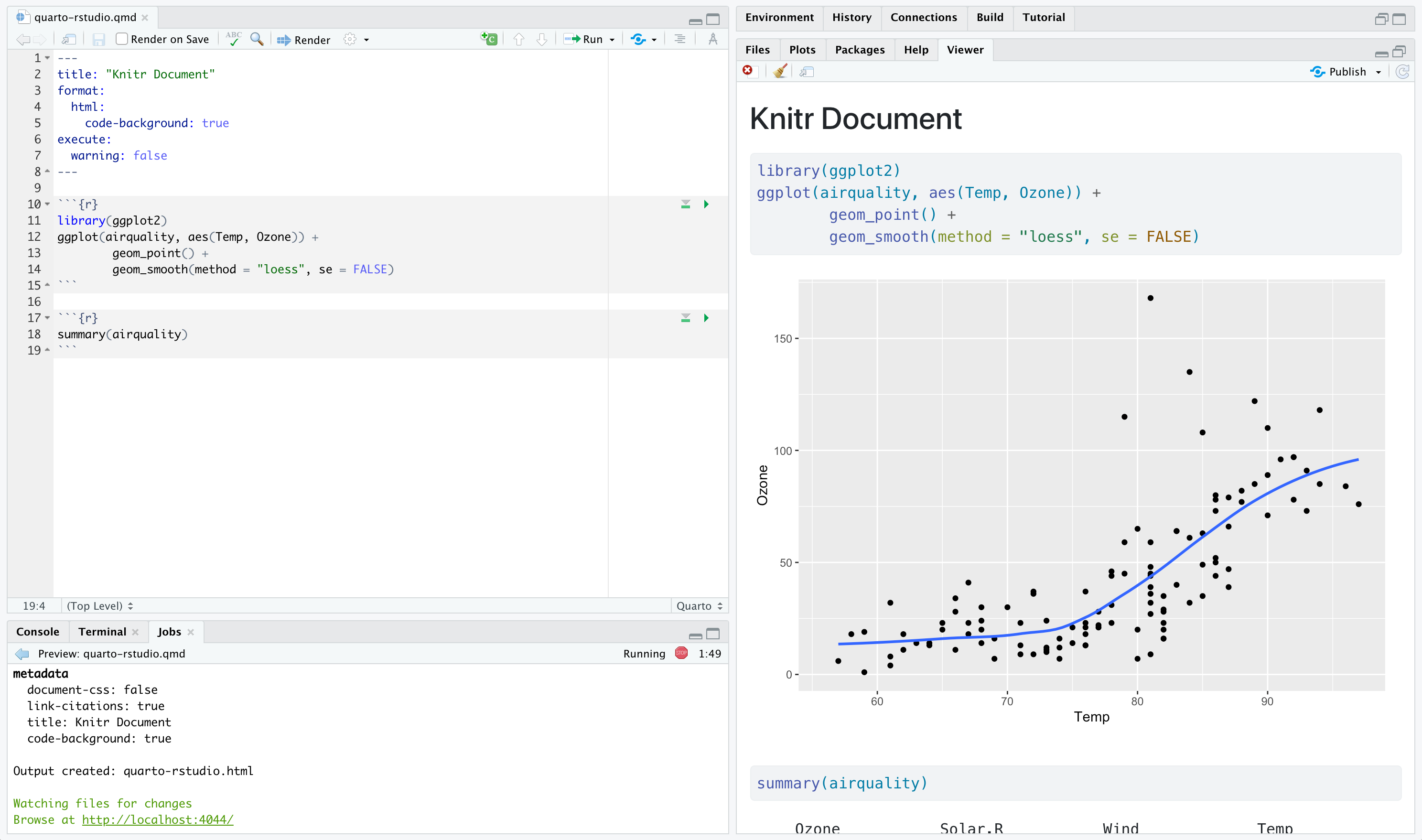
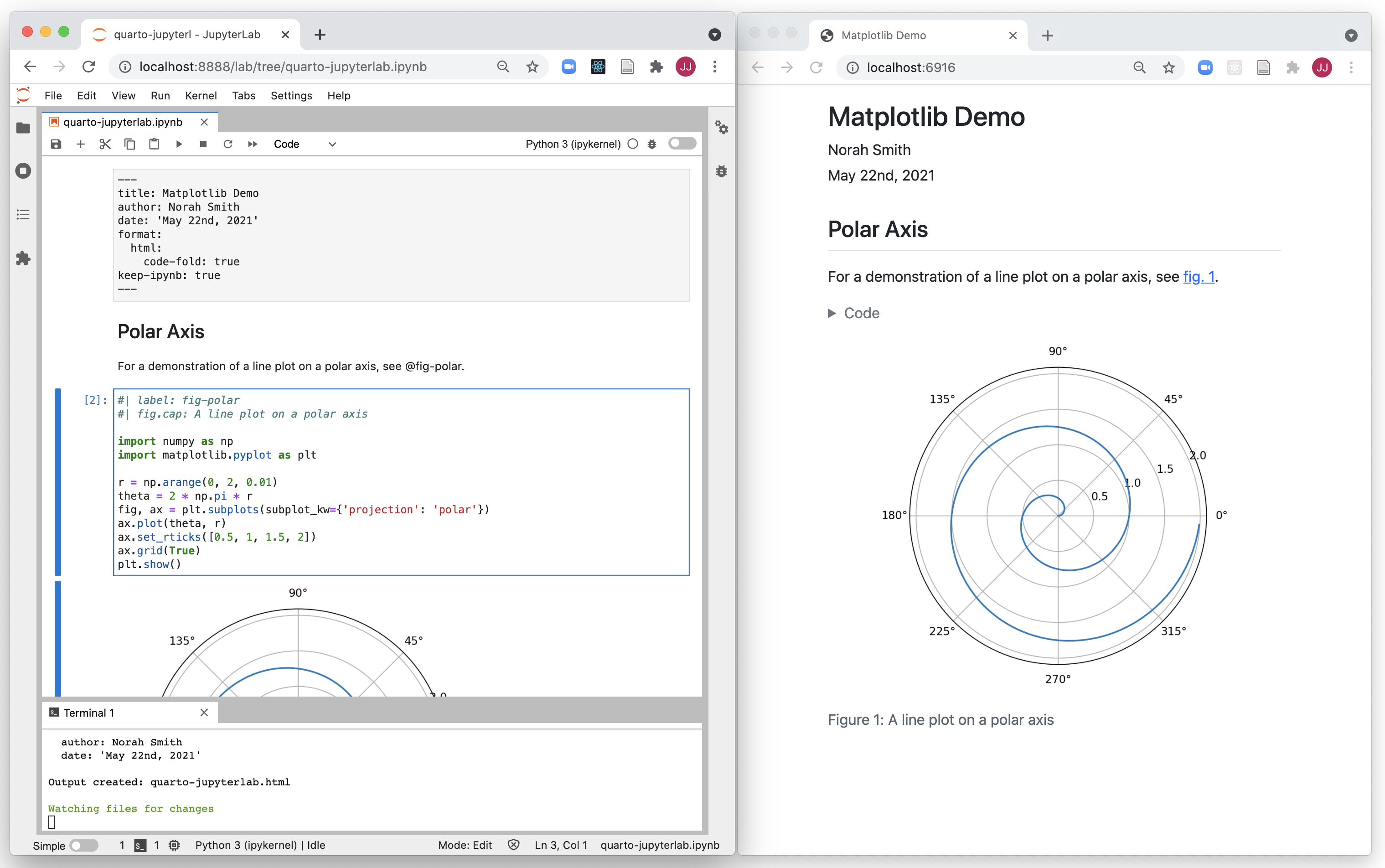
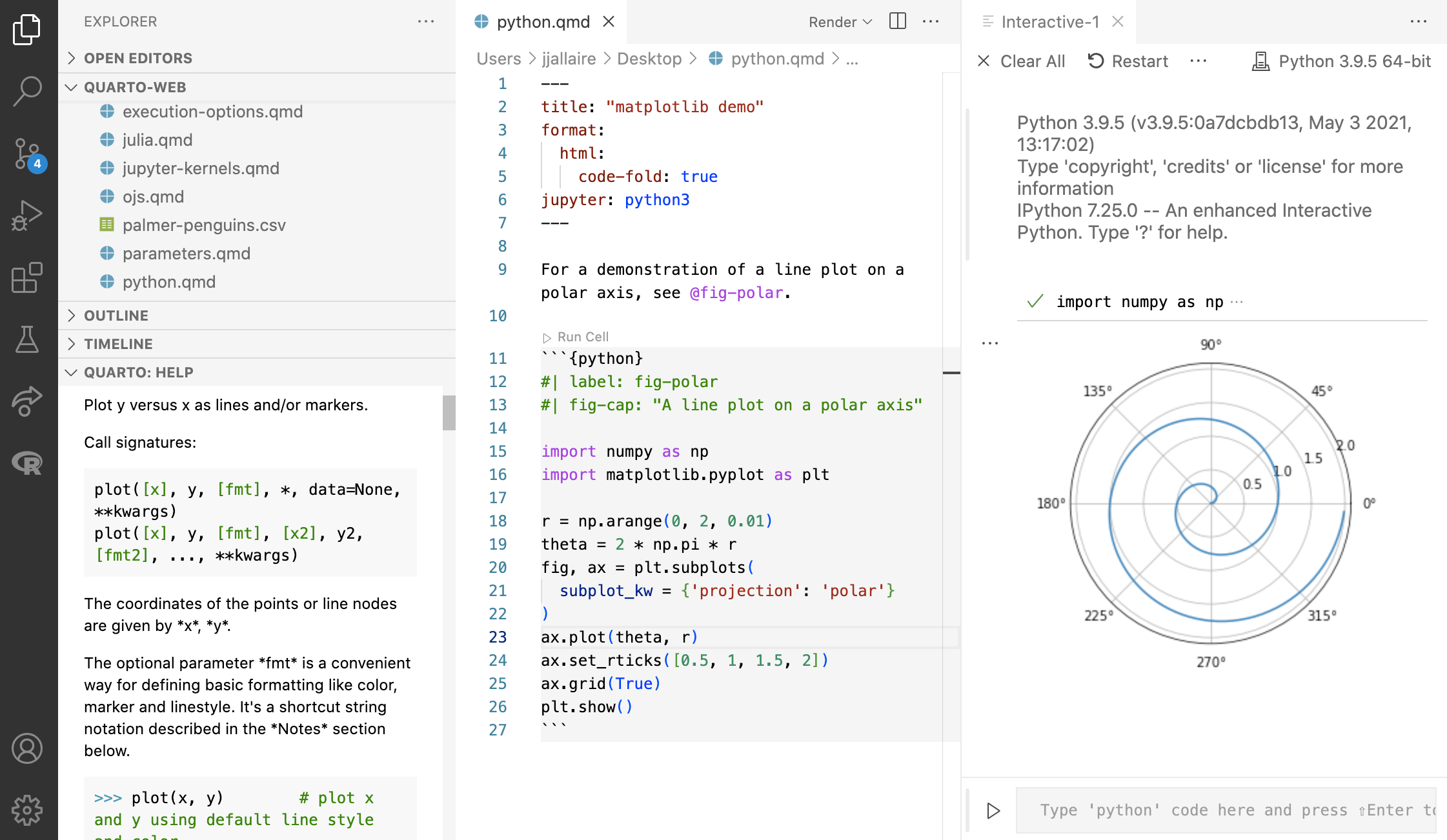
Navigating within RStudio
Quarto workflow
Rendering a Quarto file in RStudio via the Render button calls quarto render in a background job, preventing Quarto rendering from cluttering up the R console, and gives you and easy way to stop:

Rendering
- Option 1: In RStudio as a background job, and preview the output.
- Option 2: In the Terminal via
quarto render:
Your turn
- Open the last .qmd file you were working on in RStudio.
- Compare behavior of rendering with
- RStudio > Render,
- using the CLI with
quarto render, and - in the R console via
quarto::quarto_render().
- If you’re an RStudio user, brainstorm why you might still want to know about the other two ways of rendering Quarto documents.
03:00
Quarto formats
One install, “Batteries included”
- RMarkdown grew into a large ecosystem, with varying syntax.
Quarto comes “batteries included” straight out of the box
- HTML reports and websites
- PDF reports
- MS Office (Word, Powerpoint)
- Presentations (Powerpoint, Beamer,
revealjs) - Books
- Any language, exact same approach and syntax
Many Quarto formats
| Feature | R Markdown | Quarto |
|---|---|---|
| Basic Formats | ||
| Beamer | beamer_presentation | beamer |
| PowerPoint | powerpoint_presentation | pptx |
| HTML Slides | revealjs | |
| Advanced Layout | Quarto Article Layout |
Many Quarto formats
| Feature | R Markdown | Quarto |
|---|---|---|
| Cross References | Quarto Crossrefs | |
| Websites & Blogs | ||
| Books | bookdown | Quarto Books |
| Interactivity | Shiny Documents | Quarto Interactive Documents |
| Journal Articles | rticles | Journal Articles |
| Dashboards | flexdashboard | Coming soon! |
Your turn
In RStudio, go to File > New File > Quarto document to create a Quarto document with HTML output. Render the document, which will ask you to give it a name – you can use my-first-document.qmd.
Use the visual editor for the next steps.
Add a title and your name as the author.
Create two sections, one with fact you want to learn and your favorite thing about R.
Add a table of contents.
Stretch goal: Change the html theme to
sketchy.
05:00
Wrap up
What about R Markdown?
You can render existing R Markdown documents with Quarto and you can rename them to
.qmdfiles to turn them into Quarto documents.You don’t have to do this – R Markdown continues to be maintained.
However, new features are being developed for Quarto.
Additionally, Quarto
Offers “batteries included” shared syntax across formats
Allows you to choose your own editor and your preferred data science language
Comes with richer and more accessible features out of the box
Is actively developed
Questions
Any questions / anything you’d like to review before we wrap up this module?
One last thing!
Where does the name “Quarto” come from?